
GSI, you using it, ha? Good for you, as GSI aka generic system image is what giving old and closed source Android powered devices a new life and stay up-to-date, i won’t discuss about what is GSI as if you’re here then i guess you may already know about GSI and tested or using one if not more, but if you really want to know more about GSI then read my exclusive article about Android Treble Project.
In here, I’ll try to give a sneak peek about GSI, basically the history dates back to year 2017, when Google introduced Project Treble on Android Oreo 8.0, to simplify testing and updating newer versions of Android for developers and OEMs, which means you must have a project treble compatible device, in order to use GSIs, if you have project treble compatible device, then you’re good to go.
Basically, if you have Android device that came with 8.0 or 8.1 oreo version or got it through updates or upgrades either from OEMs or custom rom developers from XDA or anywhere else, then by default it is usually compatible and fully supported with project treble, but if by any chance you’re device didn’t officially or unofficially got Android oreo, then don’t worry there are developers who managed to port project treble for many unsupported and incompatible devices.
8.0 oreo, is lightweight, simple and quiet widely expanded and most used version of Android, after 4.4.4 kitkat, as Android 8.0 has a lot of reach and popularity among regular users, as well as geeks and developers, as it introduced many revolutionary and amazing technologies, like especially project treble, eventually number of developers recognized the immense potential of Project Treble and started adventures on it like Phhusson.
In sense, Android 8.0 Oreo is big leap in Google’s software infrastructure and Android ecosystem, it thrived and shaped future of Android and its community in various ways, and out of them Project Treble played key role in development and progress of Android OS in reach of millions of users worldwide, i guess all this is well known history if you’re even bit into tech, now you know anyway, so let’s focus on developers who contributed to Project Treble, to make what it is today.
I’d say Phhusson, is one of the first few GSI developers, who begin project Trebledroid to easily develop and build GSIs with a lot of fixes and patches to boot on many Android devices, after him came Erfano Abdi whose specialization is making and porting GSIs from OEM and custom roms using his GSI tool and scripts, though later on Erfano Abdi left the scene of GSIs, but Phussson and many other skilled developers continued development of GSIs and Project Trebledroid.
Phhusson done quite astonishing work on Project Trebledroid, like Trebledroid patches in which you’ll get necessary patches required to boot latest android version GSIs on legacy Android devices with old kernels, including that Phhusson implemented and contributed various fixes and features packaged in Treble Settings on GSIs to let you get better experience on GSI via any device, Phhusson efforts are for real big deal, and provided proper structure and route map for the future development of GSIs.
The work and traces provided by Phhusson is taken as base and inspired many developers starting from era of SGSIs, in recent times Phhusson is still continuing development of Trebledroid and providing support whenever possible, meanwhile many more developers like Nippon who is inactive now but early GSI developer after Erfano Abdi, later we got Mystic GSI, Mytja, Doze Off etc, who joined the scene and contributing to development of various GSIs and Trebledroid project, to boot latest versions of Android on outdated devices, pretty useful right?
Usually, most GSI developers with Trebledroid patches, and with their own implementations and fixes try to provide best possible GSIs with less bugs and possible stability to boot on most devices especially old ones, as it is very known in GSI community, majority of folks who use GSIs are those with the legacy or low end Android devices which have old or closed source kernels, but even then as name implies GSI is generic system image, so no developer can guarantee full bug less GSI.
GSI depends primarily on vendor and kernel, and it doesn’t have OEM specific stuff like fixes or features etc, so if your vendor and kernel is not compatible enough with GSI then it won’t boot in first place, and even if booted still you may expect to find certain bugs if not many atleast few here and there with possibility of lag and instability due of lack of proper tuning and optimizations in between software and hardware etc.
Which is why Trebledroid project came into existence with Trebledroid patches to add the necessary stuff to make GSIs boot on any chipset and OEM Android device possible, but even then Trebledroid project and patches also has generic fixes so they can’t guarantee absolute bug fixes, optimizations, speed and stability etc, as GSI developers don’t have your device on hand to do explicit changes to get such stable output, understood?
Where is on custom roms, you’ll find dedicated developers who own device to do specific and proper adjustments and developments required for device, which is different story, let’s not get into it, we now solely focus on GSIs, as said its hard to get fully stable GSI for your device, but that doesn’t mean impossible, with some proper trail and errors, testing and research, you can find a near to stable, if not fully stable GSI.
Yes, you may find near to stable, even stable GSI in rare cases, but don’t ask me about the difficulty in finding it, cause it depends on you and device you’re trying GSI, it is hard to find near to stable GSI, as even in same rom, for instance lets take Axion rom GSI, which is minimal, yet even in that certain GSI version won’t boot on device, like for instance EOL gsi version may won’t boot but just its previous version of it may boot and work fine, so it all depends, you have to test, find and figure out which one is working well for you.
When you find near to stable GSI for your device, then better stick to it for while, instead of frequent updates and upgrades, as even a little bumped version GSI is not at all guaranteed to work and support is lacking as well, just keep in mind GSIs are not custom roms, so, don’t keep both in same line, if you do it’ll backfire, anyway lets for suppose you have near to stable GSI, even then on it you may find slight sluggish and pressured lag, have you ever wondered, why exactly?
You may be guessing, because its GSI, may be because i have low end Android device, or probably old open source or closed source kernel, may be there isn’t enough tweaks, patches and fixes etc, which all are possible reasons and can be true at times, but on a near to stable gsi and on certain chipsets like mediatek, the slight sluggish and pressured lag that you may encounter is not always because of less ram, cpu, gpu, instead we recently get to find out there is different reasons for this.
Here’s what our research about slight sluggish pressured lag on near to stable GSI led to discovery of real issues behind it, which are DVFS oscillation, Thermal micro-throttling, GSI ↔ vendor mismatch, Missing OEM touch boost, yes this are primarily ruled out key problems that’s causing trouble on your GSI, though we identified it on Mediatek device, but it may applicable on other chipset device as well, now we know the issues? So you may ask how do we fix this? well hold on.
The issues, DVFS oscillation, Thermal micro-throttling, GSI ↔ vendor mismatch, Missing OEM touch boost, are something that require developer level expertise to fix them, because if you have Android 10 vendor but tries to run Android 14 or Android 16, what will happen? Yes there will be a lot mismatch, so even with a lot of patches, fixes and tweaks, there will be always something that’s missing, and there is no instant and simple solution, but things become complicated as you go.
However, you can solve this slight sluggish pressured lag, or whatever other bugs and issues etc, if you go back to your stock rom, if oem provide worse stock than your current GSI, that’s a heck of a situation, but usually stock roms has oem level enhancements and tuning explicitly done for your device, so on most stock roms, you’ll find proper DVFS oscillation, Thermal micro-throttling, GSI ↔ vendor match, Missing OEM touch boost and many more for full fledged experience.
In case, You can’t or don’t want to go with stock rom, may be because its outdated or not good enough, and OEM don’t provide latest android versions and security updates, so as there is no choice in order to stay up-to-date had to stick with GSIs, then you’re not alone, Well then listen carefully, in simple you can’t fully fix those above mentioned issues but you can reduce their effects on GSI by disabling and enabling certain features and options on GSI, so are you ready?
Note: remember, the solutions we tried, seems to have considerable impact on mediatek device, but I’m not sure about other chipsets, it should work but not guaranteed, i guess worth a try to figure out instead of staying idle, and keep in mind, after you apply all solutions we are going to list, GSI may only reach 80-85% smoothness ceiling, above that seems not possible due to lack of OEM stuff, if you’re ok with it, like better to try something over nothing, then let’s get started.
• How to fix slight sluggish pressured lag on GSI •
– first use minimal system default launcher provided by your GSI, not third party ones.
– No widgets on home screen.
– Use static wallpaper, not live ones.
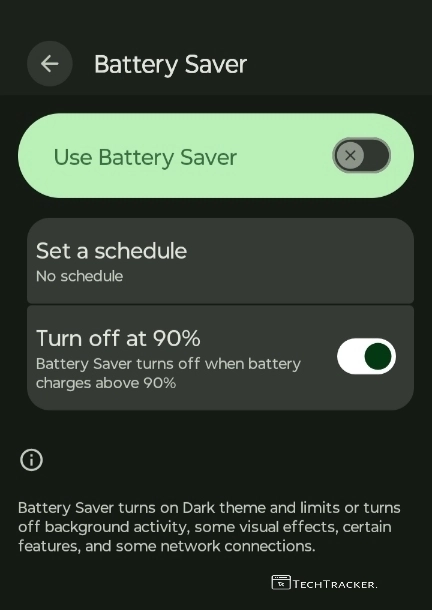
– Don’t, use battery saver mode.
– Wi-Fi scanning → OFF
– Bluetooth scanning → OFF
– Nearby device scanning → OFF
– Printing services → OFF
– Unused accessibility services → OFF
– Digital Wellbeing → DISABLED
Once you done above basic settings, now apply addtional settings shown below.
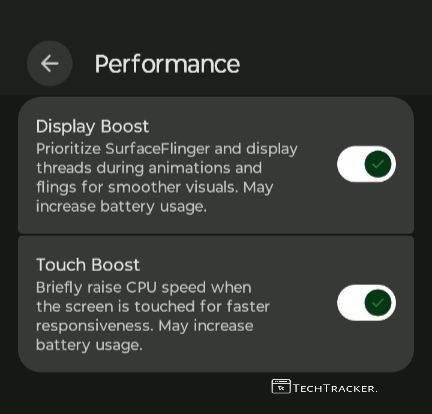
– In performance, if available on GSI, enable display and touch boost.
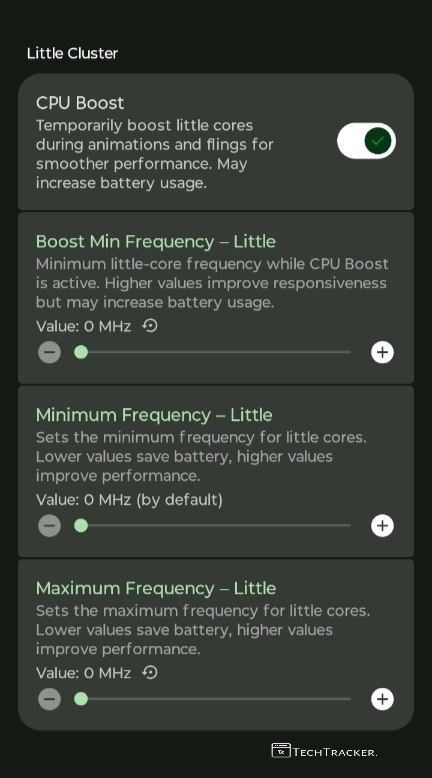
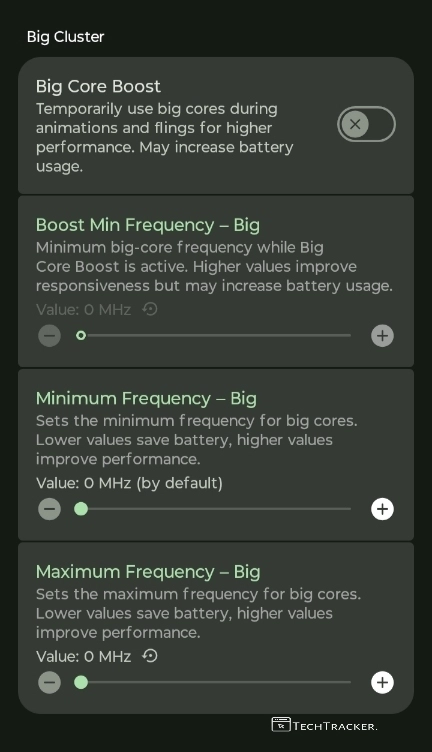
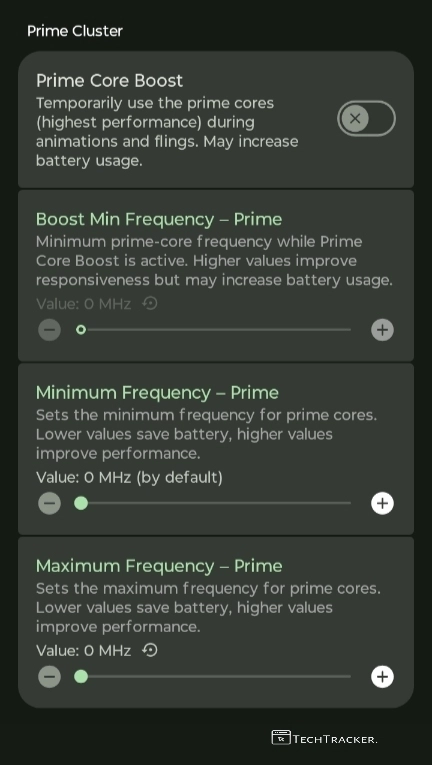
– In performance, Keep little, big, prime cluster CPU min/max MHZ -> 0 (default)
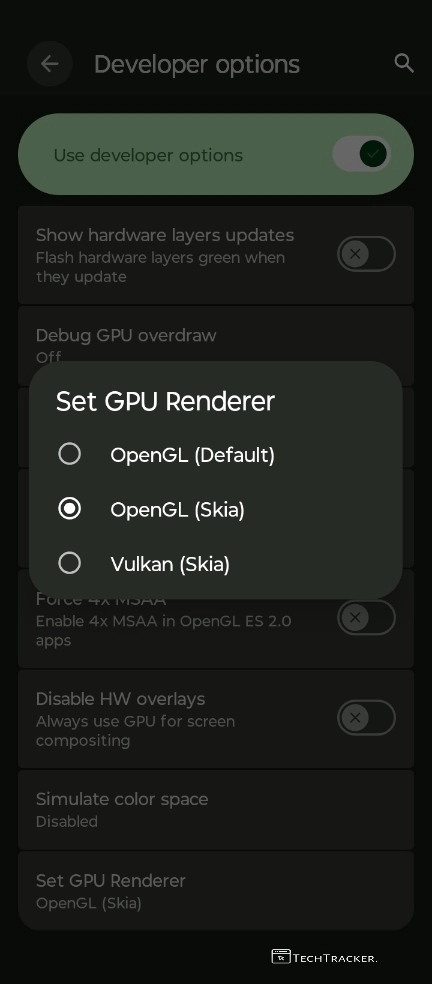
– In developer settings, GPU renderer, use system default, use the same GPU renderer shown in stock rom on GSI as well.
– Usually for most old devices, it is OpenGL.
– Also Disable HW overlays → OFF and Force 4× MSAA → OFF in developer settings.
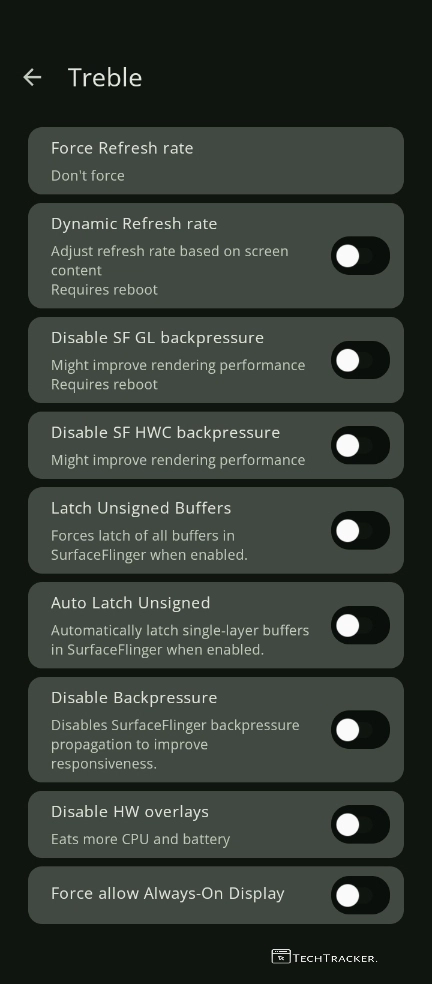
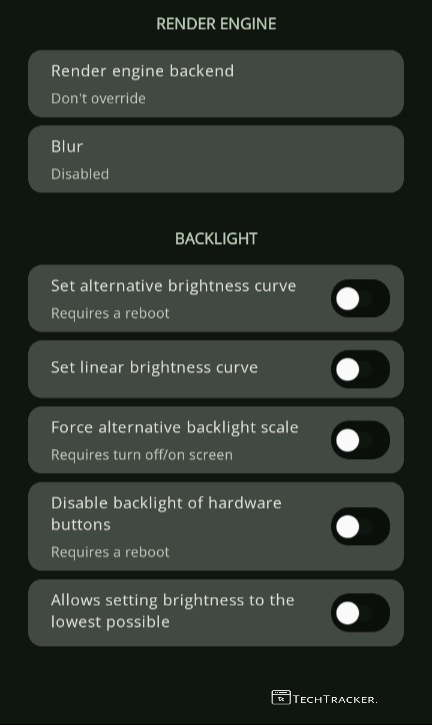
– In Treble Settings, under display, apply options as shown above.
– if you use mediatek device, turn off auto latch unsigned, but for snapdragon chipset device, enable that option, don’t disable it.
Once, you done, now lets focus on keyboard, it is important to apply below settings in keyboard, especially if you use it everyday, for better typing experience on GSI.
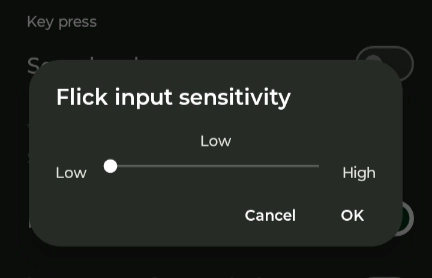
– When it comes to keyboard/gboard.
• Sound → OFF
• Vibration → OFF
• Glide typing → OFF
• Flick/Glide sensitivity → LOW
Done? well If yes we are almost near for completion, now lets check some last key settings required to be done on GSI.
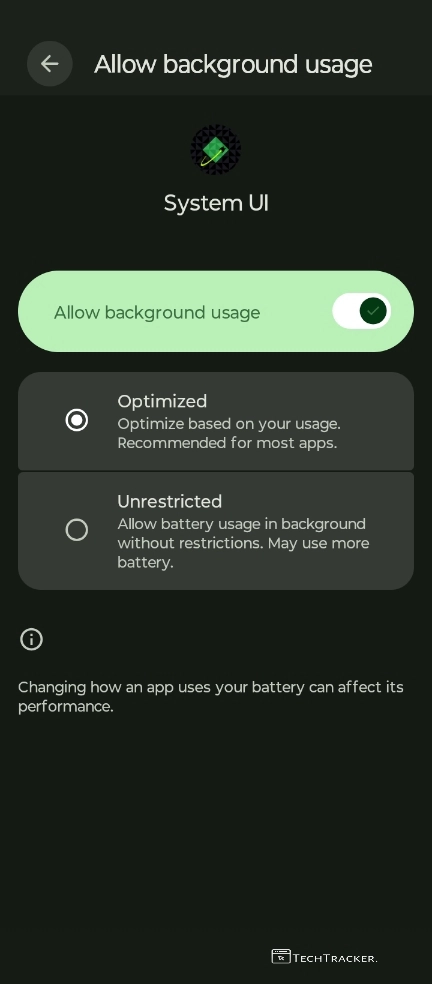
– System UI -> Battery Usage -> Optimized.
– Don’t use Perf MTK/AI governer modules.
– Don’t use reset prop/perf packs.
– Don’t use RAM/ZRAM Tweaks.
– Don’t use LKMD Modules.
Completed, let’s move on to final step.
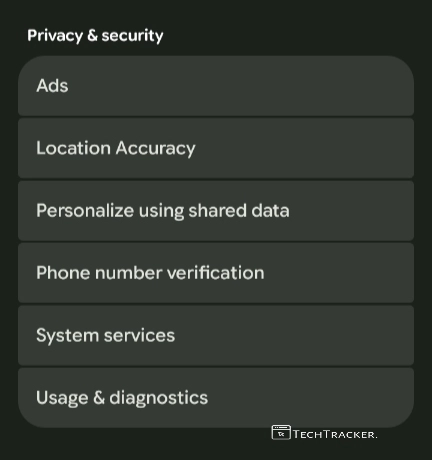
– In Google Services, delete advertising id and turn off Usage & Diagnostics.
– Check Google Services, thoroughly to disable unnecessary stuff in order to improve overall usage experience of your GSI.
– but, do your own research before you delete or turn off anything in Google Services, got it?
That’s it, once you done everything shown above, its completed, enjoy.
Finally, this is how you can optimize and fix slight sluggish pressured lag on GSI, especially if you use it on mediatek devices, but yeah each device is unique, so there is no guarantee you’ll reach 80 – 85% smoothness ceiling, so don’t have over expectations, instead try and find out yourself, if this GSI setup, worked for you in anyway, contact us and share your experience, see ya 🙂